Google Aluminum OS has been accidentally leaked, and after seeing this leak, I can only say that Aluminum could completely change the way we use Android. Interestingly, Android is no longer limited to just phones and tablets. Instead, Google appears to be transforming it into a full-fledged desktop operating system with a taskbar, resizable windows, desktop Chrome extensions, and native Android app support. Furthermore, this leaked Android 16 desktop interface hints at Google’s long-term vision of replacing traditional PC operating systems. So, let’s find out what exactly has been leaked.
Google Aluminium OS Leak: What Happened?
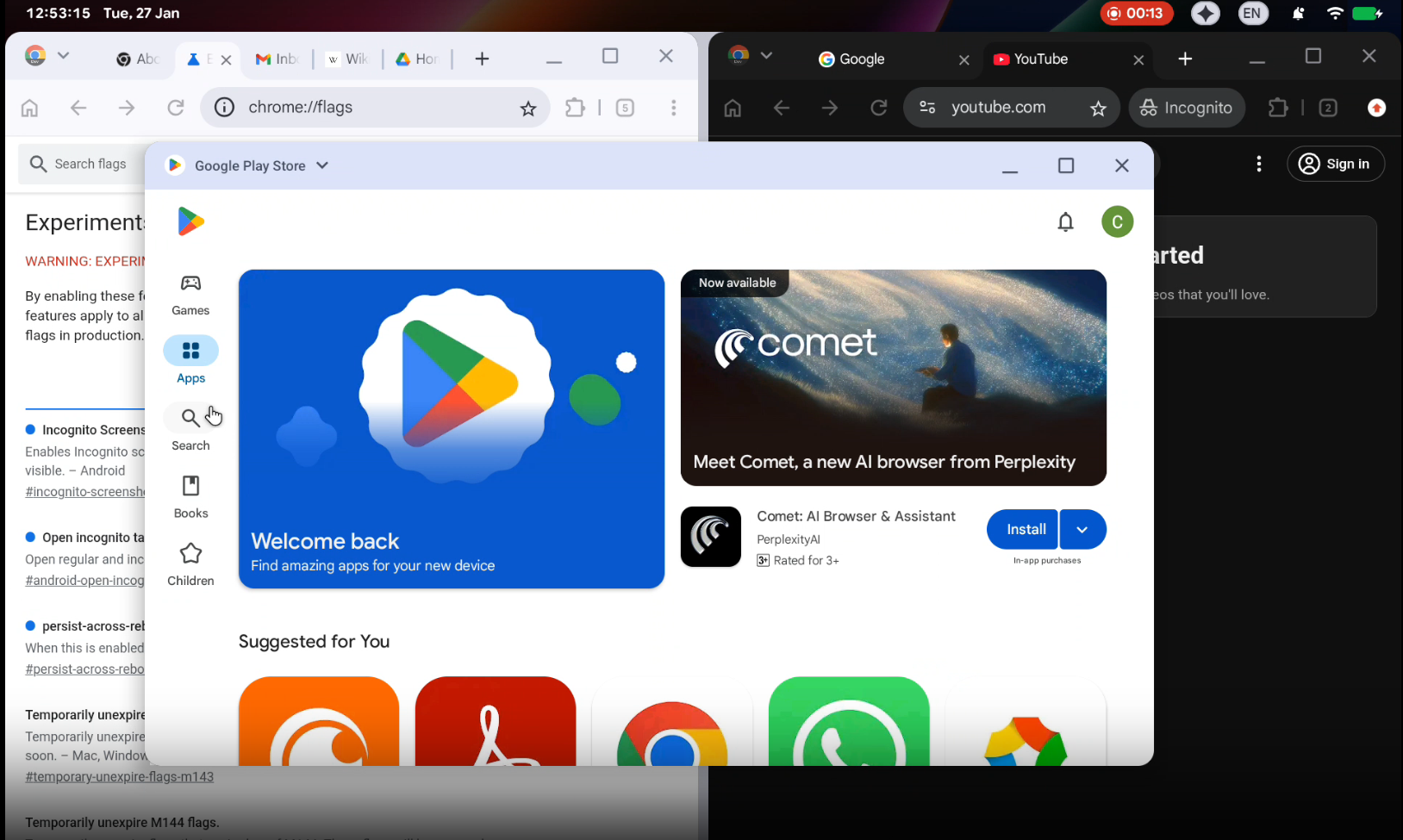
It’s worth noting that a Google bug report recently published on the Chromium issue tracker inadvertently revealed the first real glimpse of Android’s desktop interface. Interestingly, the report focused on Chrome’s Incognito tabs. However, the attached screenshots revealed much more than expected. As a result, tech enthusiasts quickly noticed a completely new desktop-style Android layout being developed internally at Google.
Test Device and Internal Build Details
According to the leaks, Google has been testing Aluminum OS on the HP Elite Dragonfly 13.5 Chromebook, which has the internal codename Brya (Redrix). Furthermore, this device runs on a 12th Gen Intel Core Alder Lake-U processor from 2021. This clearly indicates that Google is using existing Chromebook hardware to develop the future of Android on the desktop.
Additionally, the leaked build has the codename ALOS, which is an abbreviation for Aluminum OS, with the version number ZL1A.260119.001.A1. A reference in the screen recording further confirms that this desktop experience is based on Android 16, making the leak even more credible.
New Desktop-Optimized Status Bar
Upon closer inspection of the leak, the new status bar appears significantly longer and better optimized for larger screens compared to Android tablets and phone-based desktop modes. Additionally, the top row now displays the time with seconds, followed by the date for improved productivity.
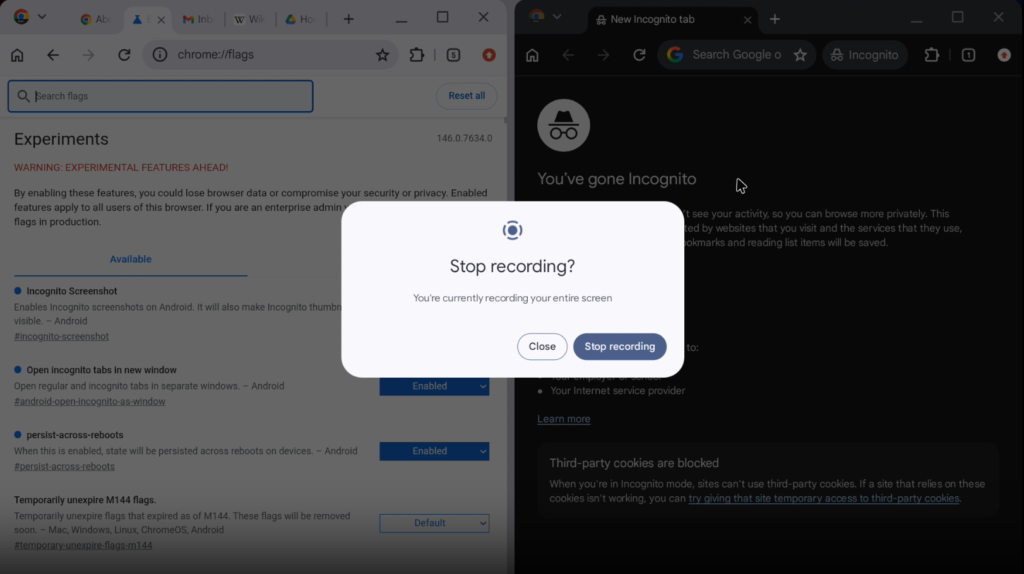
On the right side, users can see the battery status, Wi-Fi indicator, notification bell, keyboard language indicator, Gemini AI icon, and a screen recorder pill. Interestingly, while the overall layout seems designed for a desktop environment, the screen recording interface still resembles Android’s mobile UI. It’s worth noting that Aluminium OS is based on Android, so some apps and their interfaces will naturally look similar.
Taskbar and Cursor Enhancements
Meanwhile, the taskbar will look similar to the existing Android desktop mode, as the leaks clearly show that the taskbar hasn’t changed much. However, Google has slightly improved the mouse cursor, adding a small tail for better visibility on larger displays. While the basic design remains familiar, these subtle changes clearly indicate a desktop-first optimization approach.
Chrome Browser With Full Desktop Extensions
One of the biggest highlights of Aluminum OS is Google Chrome with full desktop extension support. Unlike the current Android version, Chrome on Aluminum OS includes an extensions button, which was previously only available on Windows, macOS, and ChromeOS.
This means users will soon be able to run productivity extensions, developer tools, and advanced browser add-ons directly on their Android desktop. However, Google has not yet confirmed support for Windows or macOS applications.
Window Management and Multitasking
When it comes to multitasking, Aluminum OS looks familiar yet improved. The desktop windowing appears to work similarly to existing Android large-screen layouts, with app titles displayed on the left. Minimize, maximize, and close buttons are located in the upper right corner, closely resembling the way ChromeOS operates.
Furthermore, split-screen multitasking seems to work seamlessly, reinforcing Android’s readiness for keyboard and mouse workflows. Therefore, we can confidently say that Android is no longer just mobile-first—it’s also ready for productivity. What do you think? Can Aluminum OS compete with Mac and Windows?
Keyboard and Mouse-First Interface
Unlike previous Android desktop attempts, Google’s Aluminum OS is clearly designed for keyboards and mice. Touch input is also optional, making this OS ideal for laptop and desktop setups. Furthermore, this approach directly positions Android to compete with traditional PC operating systems.
Native Android App Support
Most importantly, Google’s Aluminum OS runs native Android apps without emulation. This means users can now enjoy millions of Android apps on a larger screen with desktop-style multitasking. Therefore, developers won’t need to rewrite their apps from scratch, ensuring a smooth transition for the ecosystem. I’m personally looking forward to using Aluminum OS, and if you’re also waiting for it like me, let’s find out about the Aluminum OS release date.
Aluminum OS Release Timeline and Availability
Google has not officially announced Aluminum OS or its public release timeline. However, since the leaked build appears to be running on Android 16, an official announcement could come later this year or in the future, possibly alongside Pixel and Chromebook announcements. There is no confirmation yet regarding support for Windows or macOS applications. Nevertheless, Google’s focus is clearly on strengthening Android as a standalone desktop platform.
Overall…
The Aluminum OS leak clearly indicates that Google is preparing Android for a desktop-first future. With desktop Chrome extensions, improved multitasking, native Android app support, and a keyboard-focused UI, Android could soon challenge traditional PC operating systems. While official details are still awaited, this leak could prove to be a major turning point in Android’s development. When do you think Aluminum OS might be released?
FAQs
What is Google Aluminium OS?
Aluminium OS is Google’s internal codename for Android’s upcoming desktop-focused operating system based on Android 16.
Does Aluminium OS support desktop Chrome extensions?
Yes, leaked screenshots confirm full Chrome desktop extension support.
Will Aluminium OS replace ChromeOS?
Google has not confirmed this yet, but the features suggest long-term convergence.
Is Aluminium OS available to users?
No, it is currently in internal testing and has not been officially announced.
Apart from this, on Phone Jagat, we will bring you every new update related to Google Aluminium OS, Android 16 desktop features, and official launch details. So, stay connected with us.
SEE ALSO: Google’s New Aluminium OS Explained: Release Date, Features & Chromebook Future
(Source)